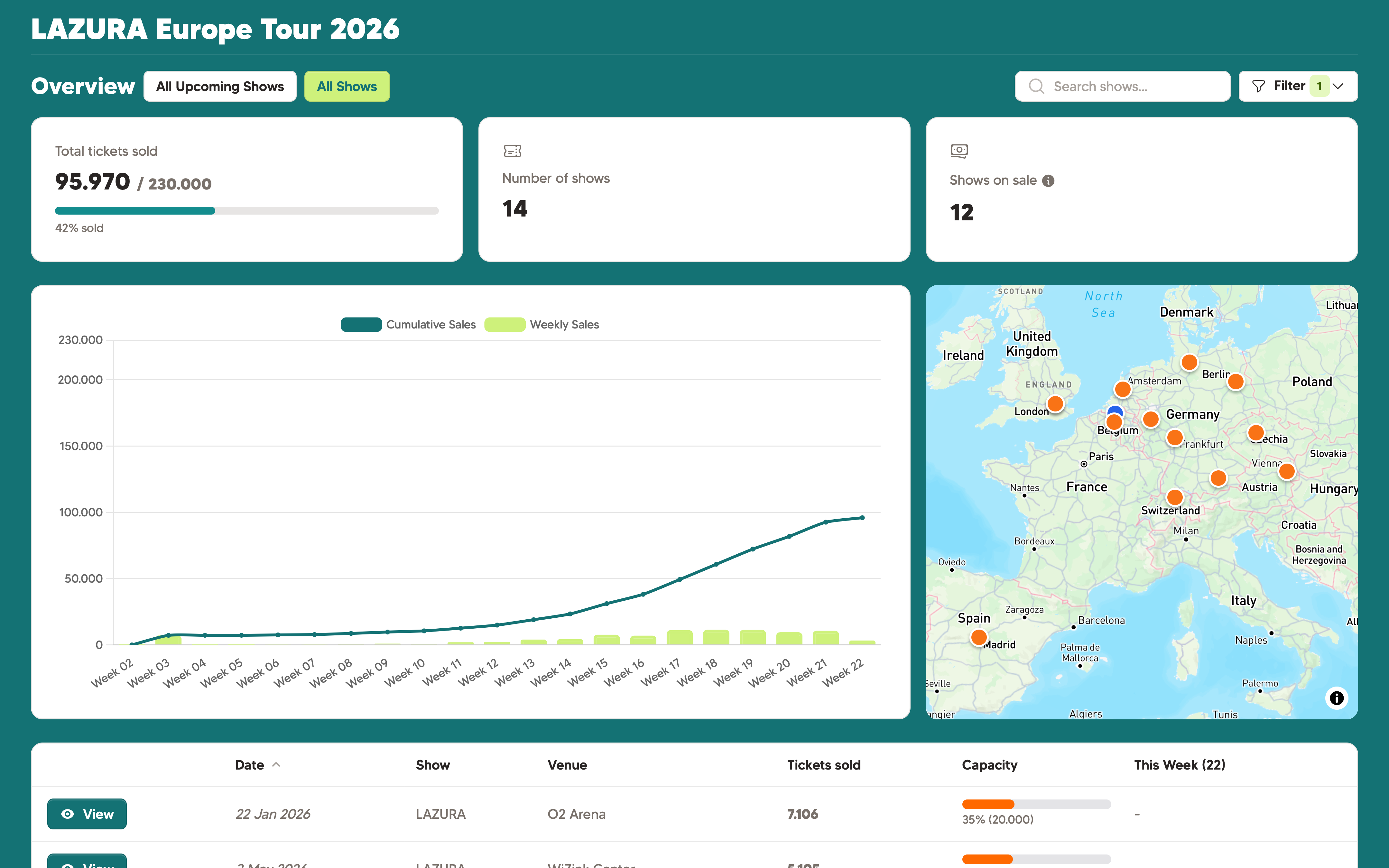
Your partners and stakeholders should be able to see your ticketsales in an intuitive, elegant dashboard. Password protected, secure and mobile-first? Enter Showtool, byebye pdf's.
You're probably now pushing numbers in a dashboard, exporting it as a pdf, and e-mailing it. Chances are mistakes sneak in, versions get messy. And let's be honest: it's just boring and repetitive. You can do better!
Showtool syncs realtime. Once connected to a ticket provider, the data will roll in, or you can add it manually.
Share a link once to your partners, instead of new info each week. Let them bookmark it, and they're all set.
With a Showtool shareable link, you can share all the insights you want, without worrying about them breaking your ticketsales. No "edit" or "delete" buttons here!
We tried to making the Showtool shareable links as elegant and easy to use as possible. We think we nailed it.
Combine as many shows in one link as you want. You can even combine data from multiple ticketeers into one single overview.
You can add a password to your link, to make it even more secure.
Add an expiry date to your link. Set up once & then forget about it!
The shareable link opens a mobile-friendly read-only view. No Showtool account needed!
What they see: the event name, date, venue, ticket counts broken down by type, sold percentage, and any marketing data you've chosen to include. The numbers update live. When your ticketing platform syncs, the page reflects it.
What they can't see: your other events (unless you've included them), your account details, your pricing, or any buyer personal data. The view is exactly what you configure.
Emailing PDFs or spreadsheets
Showtool share links
No. Shareable links are fully accessible without any account. The recipient just opens the link - optionally enters a password if you've set one - and sees the live ticket counts.
Yes. When generating a share link you can set an expiry: 7 days, 30 days, or a specific date. After that date, the link stops working. You can also revoke it manually at any time.
Yes. You choose exactly which events are visible in each share link. Create a link per show, or one link showing a set of events.
Your shareable links have a unique link which is impossible to guess. You can add a password which not even we can see, with a user being logged out after 5 failed attempts. You can read more about our security policy on our security page.
14-day free trial. No credit card required. Connect your ticketing provider and share your link in minutes.