
TikTok Ads logo

Finally, connect TikTok Ads with your ticketing platforms

TikTok has become one of the most powerful discovery channels for live events. If you're spending on TikTok Ads, you need to know which campaigns are actually selling tickets, and not just generating views.
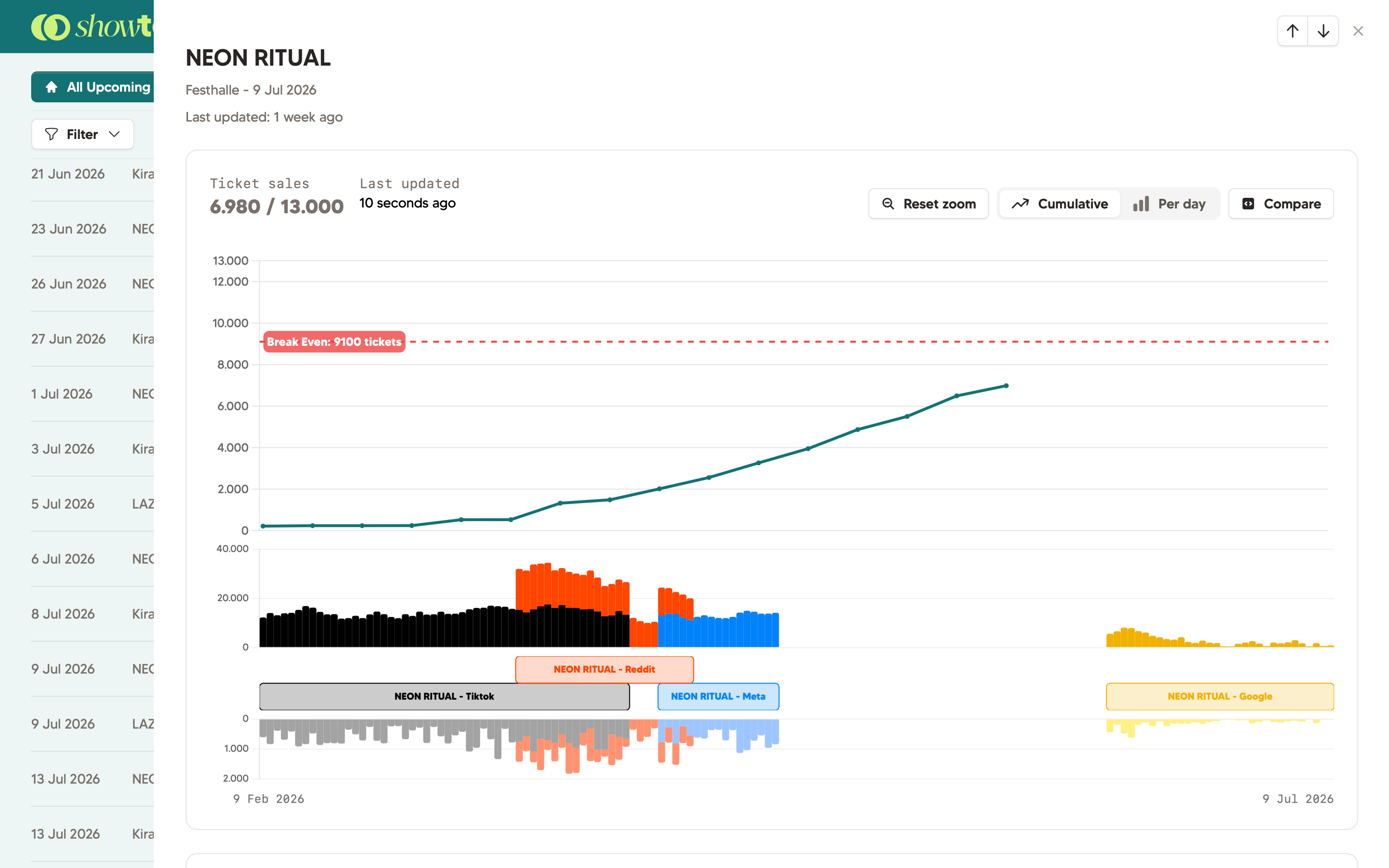

TikTok Ads integration in Showtool

Finally, your marketing effort and ticket results in one graph.

TikTok Ads can be one of the most powerful channels for lovers of live music. However, you'll probably run a campaign on Meta Ads or Google Ads. Good luck combining that into one dashboard; except if you're using Showtool.

Showtool maps your TikTok Ads campaigns to specific shows. You see spent and reported conversions next to your actual ticket sales: in one dashboard, updated realtime, without a spreadsheet in sight.

You can share this dashboard effortlessly with team members, external marketeers and stakeholders.

Why use Showtool

  • TikTok Ads data mapped per show: not just per campaign
  • Actual ticket results vs. TikTok impressions in the same view
  • See TikTok Ads next to Meta Ads and Google Ads.
  • Easy and understandable: set up once

How it connects

1

Connect TikTok Ads

Authenticate via a simple 'Connect'-button. Showtool only reads your campaign data: it cannot create or modify anything.

2

Connect your ticketing provider

Link Weeztix, Ticketmaster, Paylogic, CM.com, or add tickets manually. We'll take care of the rest.

3

Connect campaigns to shows

In Showtool, attach each TikTok campaign to the relevant show. This takes a minute per campaign.

4

See the combined view

Your dashboard now shows daily ticket sales, ad clicks and impressions. Hover over a day to see the detailed view. No need to log into your marketing account again!

What you see in the dashboard

Showtool dashboard

  • Daily ticket sales, ad clicks or impressions
  • Clicks and impressions, grouped by ad campaign
  • Ticket sales: show per day or cumulative ticket sales
  • Combine all marketing platforms you want
  • Stacked barcharts to group Meta Ads, Google Ads, Reddit, TikTok and more

Shareable links

  • A password-protected link per event showing live ticket counts
  • Mobile-friendly: readable on any smartphone
  • No external login needed: just the link is enough
  • Link can expire automatically if you want to

Showtool vs. building this manually

Manual dashboard

  • Several days to build and connect the data sources
  • Breaks whenever TikTok or your ticketing provider changes their API
  • Needs an active developer or data analyst to maintain
  • Sharing often not possible, you'll need to export
  • Historical data requires careful backfilling
  • No live ticket count sync without custom scripting

Showtool

  • Live in about 15 minutes: connect both integrations and you're done
  • We maintain the integrations, no worries on your side
  • No developer needed. Works out of the box.
  • Password-protected share links, no account required
  • Historical data imports on first sync
  • Combine multiple sources into one

Frequently asked questions

Does Showtool require a TikTok Ads account?

No. You can simply start by adding data manually. You don't even need a ticketing platform to begin with; you can just add ticket data manually. Of course; both the ticketing integrations and marketing integrations help you get up to speed fast.

Is my marketing data protected in Showtool?

Yes. We only ask for 'read-only' permissions. This means from Showtool you cannot manage your campaigns. Which also means one of your team members can also not accidentally modify or delete a campaign.

Can I see my marketing data per ad campaign?

Yes. Showtool will let you connect one or multiple ad campaigns to a Showtool show. This means you'll only see the data which makes sense.

Which metrics does Showtool sync?

We'll show clicks and impressions in Showtool. In our experience, that's the most important data our customers need, without becoming too overwhelming.

Related

See TikTok Ads clicks & impressions next to your live ticket sales

14-day free trial. No credit card. Connect TikTok & More in just a few minutes.