
See your Google Ads spend and live ticket sales side by side
You're running Google Ads campaigns for your events. Your ticket sales live in your ticketeer's dashboard. With Showtool, you can finally have those two world's combined.
You're running Google Ads campaigns for your events. Your ticket sales live in your ticketeer's dashboard. With Showtool, you can finally have those two world's combined.
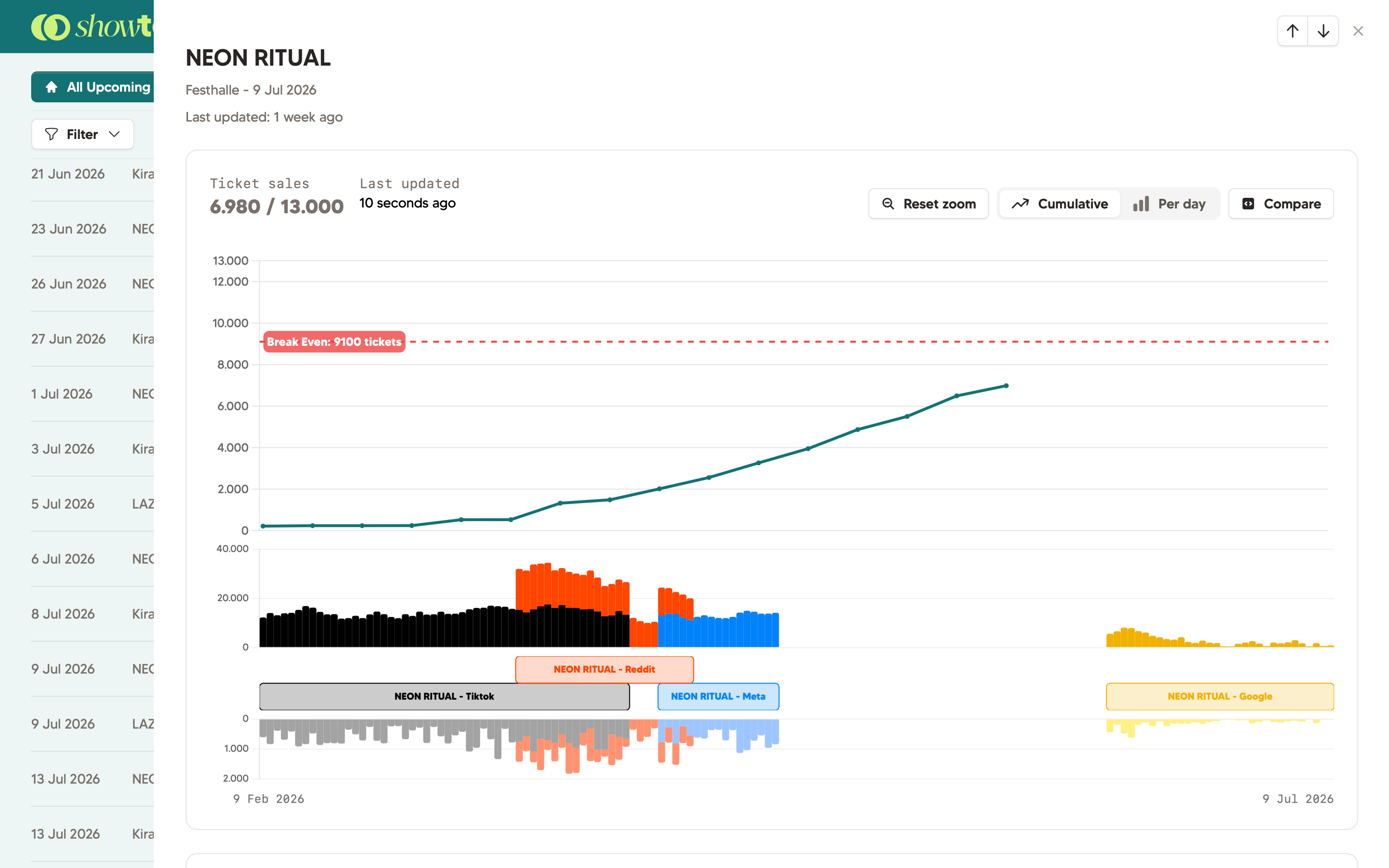
With Showtool, you connect your marketing platforms once. Once set up, we'll collect and combine the correct marketing data with your ticket sales. Just like, you know, is done manually until now.
We'll put this in an easy-to-understand graph. See clicks, impressions and ticketsales in one graph. With Showtool, you can finally put some data to your gut feeling, without becoming too heavy to work with.
This way, you can also let us do the heavy lifting. The dashboard is predictable and easy to understand. Our customers love it, and we think you'll love it too!
The big plus of using Showtool
Authenticate via OAuth. Showtool only reads your campaign data: it cannot post or modify anything.
Add a ticketing provider for automatic sync, or manually add ticket sales.
In Showtool, attach each Google Ads campaign to the relevant show. It's easy and user friendly.
Your dashboard now shows daily ticket sales, ad clicks and impressions. Hover over a day to see the detailed view. No need to log into your marketing account again!
Showtool dashboard
Shareable links
Manual dashboard
Showtool
No. You can simply start by adding data manually. You don't even need a ticketing platform to begin with; you can just add ticket data manually. Of course; both the ticketing integrations and marketing integrations help you get up to speed fast.
Yes. We only ask for 'read-only' permissions. This means from Showtool you cannot manage your campaigns. Which also means one of your team members can also not accidentally modify or delete a campaign.
Yes. Showtool will let you connect one or multiple ad campaigns to a Showtool show. This means you'll only see the data which makes sense.
We'll show clicks and impressions in Showtool. In our experience, that's the most important data our customers need, without becoming too overwhelming.
14-day free trial. No credit card. Get started in minutes.
 Book a demo